The steep cost of keeping and using data in a public cloud is increasingly becoming a dealbreaker for companies. Organizations are looking for more cost-effective alternatives, which is why we're seeing more and more cases of data repatriation (the act of pulling data currently in the public cloud and rehosting it on-site or on bare metal).
This article is an intro to data repatriation and the effects (both positive and negative) of leaving the public cloud in favor of on-prem bare metal storage. Read on to learn about the main drivers behind data repatriation and see if pulling back cloud-based data is a sound move for your bottom line.
Companies are not only pulling back data from the public cloud—a rising number of organizations are deciding to rehost cloud-based workloads and apps on-site. Learn more about this trend and why it's gaining steam in our cloud repatriation article.
What Is Data Repatriation?
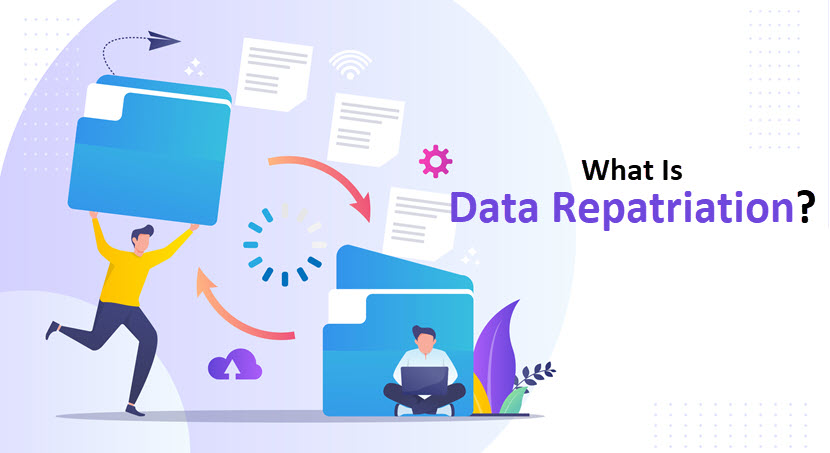
Data repatriation is the process of moving data from the public cloud to self-managed storage (such as an on-site dedicated server or a private cloud). Depending on how much data a company decides to rehost, the repatriation is either:
- Total (when an organization pulls all data and cuts ties with the public cloud).
- Partial (when a company decides to pull some but not all data from the cloud, which typically happens when a team tries to improve performance or lower cloud costs).
Data repatriation is becoming more and more common as organizations realize the steep costs of keeping large amounts of data in the public cloud. When you have a massive storage need (for example, if you have several petabytes of unstructured data you regularly access), cloud-based storage is not as cost-effective as more traditional solutions.
On average, cloud-based options cost twice as much for usage as on-site data hosting. This stat remains true even when we account for the overhead required for on-site storage, which includes the price of:
- The staff managing the hardware.
- Data center space.
- Power.
- Physical security.
The main reason behind the drastic difference in price tags is egress cost. Providers do not charge you for uploading data, but you pay for capacity and data transfers. Transfers that send data outside the provider's infrastructure are costly and often make up the biggest part of the cloud's monthly bill.
The cost is not the only reason companies choose to repatriate data. Other common causes include:
- New updates to compliance rules.
- Issues with network latency.
- Concerns about cloud computing security.
- A wish to achieve higher levels of data redundancy.
- Frequent downtime due to errors on the provider's end.
- Issues with shadow IT (unauthorized use of public cloud resources).
- A decision to pursue a different cloud deployment model.
The hybrid cloud enables you to combine multiple IT environments, so there's no need to fully move away from the public cloud even if you're looking to rehost data on-site. Here are some resources to get you more familiar with this deployment strategy:
Advantages of Data Repatriation
Like most IT decisions, opting for data repatriation has both pros and cons. Let's take a closer look at the most prominent benefits of pulling back public cloud data.
Cost Reductions and Better ROI
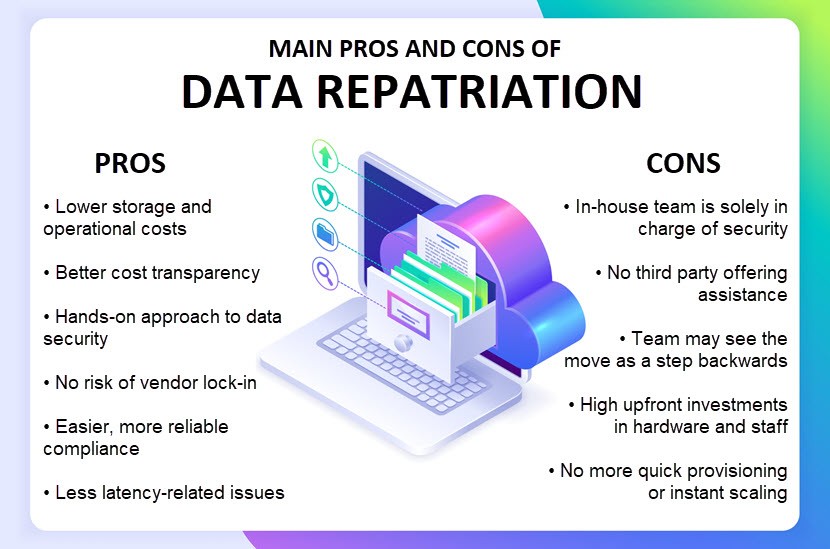
Cost is the primary advantage and the leading reason for data repatriation. While an on-prem data center is expensive to set up, public cloud costs start to add up over time as you pay monthly for:
- Storage volumes.
- Server instances.
- Per-use services.
- Data transfer costs (egress).
- "Hidden costs" (recent studies reveal that businesses spend over $62 billion annually on public cloud resources they neither need nor use.)
Sooner or later, your total cloud spending will reach the price of on-site hosting equipment. However, by that point, you've spent those funds on operational expenses of cloud computing, and you will own no hardware despite the investment. From that standpoint, on-site hosting has a far superior ROI.
Keep in mind that cloud-based storage fees are also inconsistent and hard to predict. Projected costs quickly exceed the budget since:
- Providers change pricing.
- Your IT needs change over time.
- Teams often underestimate the costs involved with operating in the cloud.
- Complex IT environments tend to suffer from shadow IT.
With an on-site storage system, costs do not change based on what you do with your data. If your IT needs grow, you'll need to invest in more hardware, but you'll never go "overboard" with a bill the way you can with cloud-based storage.
Here's a real-life example of how much money a business can save with data repatriation—in 2015, Dropbox pulled 600 petabytes of its data off the public cloud and rehosted it at a private data center. As a result, the company has saved an estimated $74.6 million in data storage expenses.
Hands-On Security Over Your Data
Hosting data in a public cloud means the provider is responsible for storing and keeping info safe. This arrangement is a godsend for some, but it might be a dealbreaker for companies looking for a more hands-on approach to data security.
There are also several unique concerns when you keep data in a public cloud:
- Hundreds of tenants (or even more) share the public cloud infrastructure, which introduces a risk element that does not exist in in-house hosting.
- There is a lack of visibility into what controls keep cloud-based data safe.
- The client's team is responsible for using measures provided by the vendor, so there's ample room for misconfiguration (the most common mistakes occur in cloud security policies).
- The provider holds the rights to files you store in the public cloud (unless you sign an SLA that states otherwise).
- The public cloud enables end-users to access data from anywhere, so there's always the possibility of sharing data with the wrong people.
While failures by providers are rare, public cloud users must know they are a possibility. In August 2018, an AWS error exposed business-critical data of about 31,000 systems belonging to GoDaddy. If the company kept the data on-site, this incident would not happen.
Repatriating data enables a level of proximity to and physical control of data the public cloud cannot offer. You also limit the attack surface by reducing the number of events that can go wrong with your data. Think of it as keeping money in a safe at home versus a safe at a bank—the bank is secure, sure, but you have no saying in how they protect safes, plus they are a prime target for robberies. From that standpoint, there's a strong case that your money is safer at home.
While direct control over data is vital for some use cases, providers go to great lengths to protect cloud-based data. Our article on cloud storage security offers an in-depth look at all the typical measures vendors use to keep customer data safe.
No Risk of Vendor Lock-In
Vendor lock-in occurs when a company becomes too dependent on a cloud provider. If you store data at a vendor for too long and build an app architecture around that storage, lock-in will naturally grow over time. You are then unable to switch to another platform (whether in-house or belonging to another provider) without high switching costs.
Data repatriation ensures your storage never relies on any provider more than your in-house team. Your staff manages the data set, and there is no risk of "getting stuck" with any third party.
Better Latency
While the public cloud provides almost limitless storage capacity, your ability to access and use cloud-based data depends on the Internet connection. Operations suffer lags if you perform processing in-house and the connection to public cloud data is slow.
Lag may not be a problem for some use cases (such as backup and recovery or email operations), but it is detrimental for some workloads, like:
- Real-time analytics.
- Cybersecurity apps.
- Sensors.
- IoT apps.
If you have a latency-sensitive app that relies heavily on a data set, hosting info on-site (or using an edge server) provides much less lag than using a public cloud. You shorten the communication path, plus the in-house team has an opportunity to fine-tune storage, compute, and networking resources to suit the app.
Easier Compliance with Data Regulations
Public cloud providers (especially hyperscalers) work hard to meet government and industry requirements like HIPAA and PCI. However, there's a major concern with meeting regulations in the public cloud: data location. If your business falls under a statute requiring data hosting in a specific region, using the public cloud could land you in a world of legal (and financial) trouble.
Instead of setting up cloud servers in specific regions and relying on a third party to not move info, some organizations prefer to take full control and relocate data to an on-prem system.
Are you storing the PII (personally identifiable information) of your clients? If yes, there's a chance your company must adhere to data-related compliance—check out our GDPR vs CCPA article for an in-depth comparison of the two most prominent data regulations.
Disadvantages of Data Repatriation
Here are the most noticeable challenges and drawbacks of opting for data repatriation:
- You'll have to set aside a budget for the hardware needed to host data on-site, regardless of what system you decide to set up (private cloud, dedicated server, colocation equipment, etc.).
- You must hire an in-house team to configure and manage the new IT environment.
- Your team is solely responsible for setting up protection and keeping on-site data safe from potential breaches, leaks, cyberattacks, and threats to data integrity.
- It's up to your staff to ensure adequate availability of data.
- When something goes wrong, it's up to your team to fix the issue. There's no provider to turn to in case of downtime, so ensure your team knows how to manage on-site databases before you decide to pull anything from the public cloud.
- Data repatriation sometimes disrupts the team's chemistry and culture. Some employees might feel like the company is taking a step back, plus you have to add some new tasks to their workday.
- Sometimes, pulling data back on-site leads to a loss of speed or performance. In that case, you'll have to re-optimize all services and workloads that use that data set, a process that often lasts at least a few days.
- You no longer have access to endless on-demand resources once you leave the public cloud, so say goodbye to quick provisioning and instant scaling. You must set aside resources and purchase new hardware if you require more storage.
Unable to assess whether a workload, app, or data set belongs in the cloud or on-site? Our article on on-prem vs cloud hosting helps pick an optimal environment for your software.
How to Repatriate Data?
Monitor the use of cloud resources and periodically compare those costs to alternative storage methods. If it becomes evident that another type of storage offers a higher ROI for your use case, it's time for data repatriation. This process looks like this:
- Start by determining which data you want to repatriate and outlining the goal of the change. Are you going for total repatriation, or does the partial approach make more sense?
- Consider any vendor-lock-in, architectural, or end-user issues that might slow down or prevent the move from the cloud.
- Break the plan into stages and set KPIs that enable you to monitor progress.
- Decide what the optimal hosting environment is for your data. Are you looking to bring data back to an on-site server room, or would renting a dedicated server be a better fit? Or is maybe the hybrid cloud the way to go?
- Determine the skill level of your team. Depending on how experienced employees are, some hosting options will be more appealing than others.
- Run a detailed cost-benefit analysis on the project to assess the financial impact of each viable alternative.
- Plan on how the team will update the app architecture with the data getting a new home. Is there room to improve performance or cut down on lag?
- Start moving data from the public cloud. Remember that the move takes time, and apps that rely on the data in question will be down during the process if you do not have backup storage. Cold archives are generally easier to move than frequently accessed repositories, so make a plan with the smallest impact on your UX.
- Perform extensive testing to see if all apps and services associated with the data set are performing optimally.
Looking to pull back public cloud data but concerned the team might have difficulty adjusting to a lack of cloud agility? Enter Bare Metal Cloud—BMC enables you to store data on a dedicated physical server yet manage the environment with cloud-like speed and simplicity.
When to Repatriate Data?
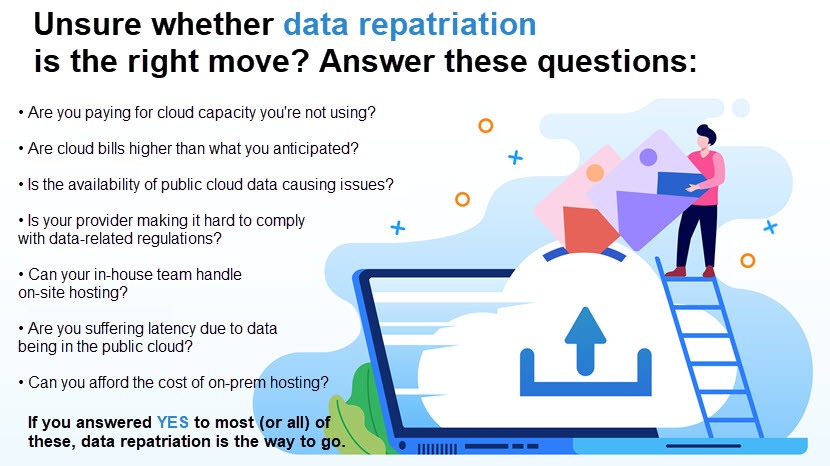
You should repatriate data when it becomes evident that moving away from the public cloud would benefit one (or more) of the following business fronts:
- Your bottom line.
- Security levels.
- Service performance.
Here are a few common scenarios in which data repatriation is the right business move:
- Cloud storage bills are getting out of hand: Begin considering other storage options as soon as public cloud bills start costing more than expected (or if you are paying for resources you do not use).
- Moving to a better-fitting hosting environment: Data repatriation often means that the company has identified a better storage solution for its use case. The most common problems businesses aim to solve are lag and availability issues.
- New compliance rules: Updates to regulations force companies in more strict industries to repatriate data from the public cloud.
- Using the cloud has run its course: The public cloud has the most significant impact during the initial phases of every project. As soon as your team starts analyzing resource usage trends, start running regular cost-benefit analyses to see if there's a need for data repatriation.
- Rushing into cloud adoption: Poor initial planning, lift-and-shift tactics, and a lack of well-rounded cloud migration plans are common reasons for pulling public cloud data back on-site. Remember that cutting losses is better than going all-in on the wrong storage solution.
- Cloud providers going out of business: Clients have no choice but to pull back their data if a vendor shuts down. While these scenarios are rare, companies must have a disaster recovery plan in case the provider folds.
Data repatriation is just one of the rising trends in the cloud world. Learn what else is going on in our article on cloud computing trends.
Don't Fear Data Repatriation and Always Go for the Optimal Storage Solution
Data repatriation is about pursuing new IT opportunities, optimizing spending, and improving app performance. These three factors come before your commitment to the public cloud, so ensure your team always considers hosting alternatives for every database, workload, and service running in the cloud.